
Change Image Background
Change image background in one click for any purpose
Application Scenarios of Image Background Changer

Before/after image upgrades
Especially for product detail pages and listings
Prompt
Upgrade the background of this product.
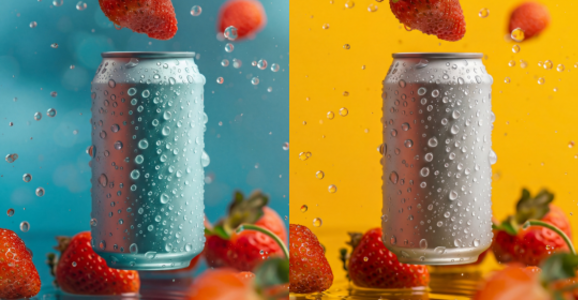
Ad variants at scale
same subject, multiple backgrounds for A/B testing
Prompt
Change the blue background of this poster to yellow.

Profile pictures
clean or stylized backgrounds for a more “pro” look
Prompt
Change the background of the image to a pure light blue.
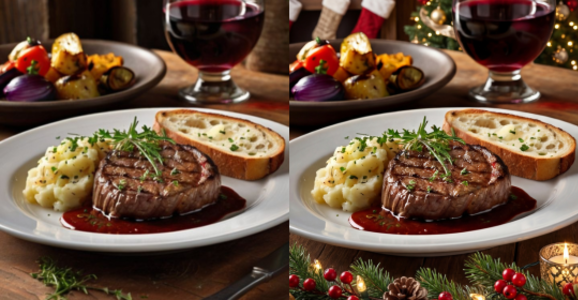
Restaurant promos
seasonal backgrounds for featured items
Prompt
Add Christmas-themed backgrounds and elements to the dishes.
Why Choose DeeVid AI Image Background Changer
Fast, automatic results
Upload once—AI detects your subject and swaps the background quickly.
Multiple ways to replace backgrounds
Use solid/gradient colors, upload your own image, or generate a new background from a text prompt.
Natural-looking composites
Optional relighting/shadow tuning helps your subject “sit” in the new scene.
Keep editing in one place
Add text, graphics, and other design elements after the background change.
Advanced Features on DeeVid Image Background Changer
AI Cutout Quality
Crisp edges around hair/fur and complex shapes with easy refinements.
Background by Prompt
Describe the setting you want (“sunset beach”, “minimal studio”, “neon city”) and generate variations.
Relight & Blend
Adjust lighting/shadows/mood so foreground and background look cohesive.
Batch Background Changes
Apply the same background style to multiple images for a consistent catalog look.