
10 Best AI Video & Image Agents in 2026: Create Better, Faster, Stronger
Quick answer: After running the same three briefs through every major tool, our top pick for an end-to-end AI video and image agent is DeeVid Agent — the only one that reliably returned a finished, edited video from a single brief. It's not the right answer for everyone, though: Seedance 2.0 and Gemini Omni produce more cinematic single shots, and Runway still wins on frame-level control. Full breakdown below, with verified May 2026 pricing.
TL;DR — winners by category
· Best overall / end-to-end agent: DeeVid Agent
· Most cinematic single shot: Seedance 2.0
· Best built-in audio + conversational editing: Gemini Omni
· Best pro control & VFX: Runway
· Best value for long shots: Kling 3.0
· Best images: Midjourney
What is an AI video/image agent?
A generator makes one clip or image from a prompt. An agent plans and runs a multi-step workflow — script, visuals, motion, voice, music, edit — and hands back a finished piece. The 2026 leap isn't resolution; it's autonomy: how much of the work the tool does for you. That's why our ranking weighs agentic autonomy as heavily as raw output quality.
· A generator answers "make me this clip."
· An agent answers "make me this whole video — figure out the steps yourself."
How I spent time with them
This isn't a lab benchmark. I used each tool the way I actually work over the past few months — putting together short brand ads, chasing a few cinematic hero shots, and building multi-scene pieces where one character has to stay the same person throughout. Everything below is what each tool genuinely felt like to use: the impressions and quirks you only pick up once you're a few projects deep. These are the seven things I kept paying attention to:
| Criterion | What we looked for |
|---|---|
| Agentic autonomy | One brief → finished edit, or just clips? |
| Output quality | Realism, coherence, no morphing |
| Video + image | Does it do both well? |
| Consistency | Same character/product across shots |
| Speed | Prompt → usable asset |
| Ease of use | Skill floor |
| Value | Capability per dollar |
Quick Comparison table
| # | Tool | Best for | End-to-end agent? | Video | Image | Free tier | Entry paid |
|---|---|---|---|---|---|---|---|
| 1 | DeeVid Agent | Finished videos from one brief | ✅ Full | ✅ | ✅ | ✅ | $10/mo |
| 2 | Seedance 2.0 | Cinematic realism & multi-shot | ⚠️ Partial | ✅ | ✅ ref | ✅ daily | ~$0.14/sec (usage) |
| 3 | Gemini Omni | Conversational editing + audio | ⚠️ Partial | ✅ | ⚠️ | ⚠️ Google acct | $7.99/mo (Google AI) |
| 4 | Runway | Frame-level pro control | ⚠️ Partial | ✅ | ✅ | ✅ | $15/mo ($12 annual) |
| 5 | Kling 3.0 | Long, stable, photoreal shots | ❌ | ✅ | ✅ | ✅ 66 cr/day | $6.99/mo |
| 6 | Pika | Fast social effects | ❌ | ✅ | ⚠️ | ✅ | $10/mo ($8 annual) |
| 7 | Luma Dream Machine | Natural motion & camera moves | ❌ | ✅ | ✅ | ✅ 30/mo | $30/mo |
| 8 | Midjourney | Best image aesthetics | ❌ | ⚠️ | ✅ | ❌ | $10/mo ($8 annual) |
| 9 | Adobe Firefly | Commercial-safe + Creative Cloud | ⚠️ Partial | ✅ | ✅ | ✅ | $9.99/mo |
| 10 | Leonardo AI | Game & stylized art assets | ❌ | ⚠️ | ✅ | ✅ | $12/mo ($10 annual) |
Pricing snapshot
Pricing checked May 2026 — verify before publishing, as plans change often.
| Tool | Free tier | Entry paid | Top consumer tier |
|---|---|---|---|
| DeeVid Agent | 20 credits (~4 videos) | Lite $10/mo | Premium $119/mo |
| Seedance 2.0 | daily free (Dreamina) | ~$0.14/sec (usage) | usage-based |
| Gemini Omni | via Google acct | Google AI Plus $7.99/mo | AI Ultra $99.99/mo |
| Runway | ✅ limited | $15/mo ($12 annual) | Unlimited $95/mo |
| Kling 3.0 | 66 credits/day | $6.99/mo | Ultra $59.99/mo |
| Pika | ✅ Basic | $10/mo ($8 annual) | Fancy (6,000 cr) |
| Luma Dream Machine | 30 gens/mo | Plus $30/mo | Ultra $300/mo |
| Midjourney | ❌ none | $10/mo ($8 annual) | Mega $120/mo |
| Adobe Firefly | ✅ limited | $9.99/mo | Premium $199.99/mo |
| Leonardo AI | 150 tokens/day | $12/mo ($10 annual) | Maestro $48/mo |
The 10 best AI video & image agents in 2026
1. DeeVid Agent — Best overall, end-to-end
Prompt: a 15-second ad for a fictional coffee brand, "Northbound Roasters," made by DeeVid Agent
What it is: An agentic platform that takes one brief and runs the full pipeline itself — generating images, animating them, scripting and voicing narration, scoring music, and assembling a final edit — in one workspace that also includes image-to-video, AI image generation/AI Image editing, AI avatar, and reference-locking.
How it felt to use: The first time I described a short coffee-brand ad and got back an actual cut — shots, voiceover, music, pacing — instead of a folder of clips to stitch, it genuinely changed how I think about these tools. What stands out in everyday use is that you stay in "director" mode: you describe and adjust in plain language ("make scene two warmer, swap the mug") and it just redoes that part — no timeline to wrestle. The feature I keep coming back to is reference-locking; across a multi-scene piece, my character actually stayed the same person, which almost nothing else here manages. Where I felt the ceiling: for a single show-off cinematic frame it's a touch behind the dedicated film models, and every so often the agent makes a creative call I have to nudge back into line.
Independent reviews of DeeVid AI, such as this review by AuthenCIO, also highlight its ease of use, end-to-end workflow automation, and ability to streamline AI-powered content creation for creators and marketing teams.
Pros:
· Only tool that returned a finished, edited video from one brief
· Genuinely strong character/product consistency (reference-to-video)
· Text-based editing — no timeline skills needed
· Video + image + voice + music in one place
Cons:
· Single hero shots slightly less photoreal than Seedance/Gemini Omni
· Autonomous edits sometimes need a second corrective prompt
· Smaller community/template ecosystem than incumbents
Best for: Marketers, social teams, and solo creators who want a deliverable, not a project.
2. Seedance 2.0 (ByteDance) — Best for cinematic realism
Prompt: a 15-second ad for a fictional coffee brand, "Northbound Roasters," made by Seedance 2.0
What it is: ByteDance's flagship video model and, since Sora's exit, the one reviewers most often crown for "most cinematic output." It generates multi-shot sequences natively with synchronized audio in a single pass, and accepts text, image, audio, and video as reference inputs.
How it felt to use: This is the one that made me sit back and go, "okay, that's a film." The cinematic quality — the light, the texture, the way it carries a moving subject — was the most convincing of anything I touched, and it came back fast. Its real signature is native multi-shot generation: it'll hand you a short sequence in one go, so a little story actually holds together instead of feeling like stitched-together clips. The flip side I felt: it's a generator at heart — gorgeous raw material, but turning it into a tight branded spot is still on me, and there's less of the hands-on knob-twiddling that a Runway gives you.
Pros:
· Most cinematic output we tested post-Omni
· Native multi-shot generation + synced audio in one pass
· Multimodal reference inputs (text / image / audio / video)
Cons:
· Less frame-level manual control than Runway
· Not an end-to-end assembler for finished ads
· Access and pricing vary by region/platform
Best for: Filmmakers and creators chasing the most cinematic shots and narrative sequences.
3. Google Gemini Omni — Best for conversational editing + native audio
Prompt: a 15-second ad for a fictional coffee brand, "Northbound Roasters," made by Gemini Omni
What it is: Announced at Google I/O on May 19, 2026, Gemini Omni is Google's new "any-to-any" model — text, image, audio, and video in or out — producing physics-aware video you edit by chatting. It's now the default creation surface in the Gemini app.
First impressions (it's only days old, so take this as early): What genuinely surprised me is editing by conversation — it remembers the thread. I'd say "make it night," then "add rain," then "now slow the rain down," and each instruction landed in the context of the last, which no video tool I'd used before really pulls off. The other standout is native synced audio: getting dialogue and picture together in one pass saved me a whole step. Realism sits right up with the best. The catch I ran into is that it's brand-new and clearly still settling, and the split — Omni in the app, Veo 3.1 in the API — is genuinely confusing at first.
Pros:
· Any-to-any I/O with native synced audio
· Conversational, context-aware editing (genuinely new)
· Top-tier realism
Cons:
· Brand-new — limits and quality still in flux
· Confusing split: Omni (app) vs. Veo 3.1 (API)
· Best inside Google's ecosystem
Best for: Creators who want to generate and refine video by conversation, sound included.
4. Runway — Best for professional control & VFX
Prompt: a 15-second ad for a fictional coffee brand, "Northbound Roasters," made by Runway Gen 4.5
What it is: A pro suite (Gen-series models + an editing toolkit) widely used in advertising and film.
How it felt to use: This is the tool I reach for when I want to art-direct rather than just prompt. With motion brush, camera controls, and video-to-video I could push a shot exactly where I wanted it — well past what a one-line prompt allows — and the fact that it does images too keeps me in one place. Its character is depth: it rewards skill. The trade-off I felt every single session is that it's a workshop, not an autopilot — building something finished is hands-on, and the credits vanish quickly once I start iterating.
Pros:
· Deepest creative control (motion brush, camera, video-to-video)
· Handles both image and video
· Pro-grade, production-tested toolset
Cons:
· Steep learning curve vs. one-prompt tools
· Costs escalate with retries
· Not an end-to-end agent — you assemble the final cut
Best for: Studios and pros who want hands-on, frame-level control.
5. Kling 3.0 (O3) — Best value for long, stable shots
Prompt: a 15-second ad for a fictional coffee brand, "Northbound Roasters," made by Kling O3
What it is: A high-quality generator (now at 3.0/O3) known for longer durations and motion stability. Reviewers single it out for raw visual fidelity and production-ready realism — arguably the quality ceiling alongside Gemini Omni.
How it felt to use: What I appreciate about Kling is its steadiness — it holds a longer, continuous shot together with noticeably less warping than most, and the realism is genuinely high for what you pay. Its character is value: it's the cheapest serious option here, and it doesn't feel cheap. What nagged me is that it's strictly one clip at a time, peak-hour queues had me waiting around, and a few of my English prompts needed rephrasing before they landed.
Pros:
· Strong duration and motion stability; top-tier realism
· Reliable image-to-video
· Cheapest serious entry point on this list
Cons:
· Single-clip workflow, no edit/assembly
· Queue waits at peak times
· 1080p + native audio burns 2× the credits of 720p
Best for: Budget-conscious creators who need longer, stable clips.
6. Pika — Best for fast, fun social effects
Prompt: a 15-second ad for a fictional coffee brand, "Northbound Roasters," made by Pika 2.5
What it is: A fast, playful video generator famous for its one-tap "effects."
How it felt to use: Pika is the one I open when I want something postable in minutes. The effects are genuinely fun, the turnaround is quick, and for a snappy social clip it's hard to beat. Its character is exactly that — speed and play over polish. Where I felt the limits is the moment I pushed it toward realism or anything longer and consistent: it falls behind the leaders, and clips stay short.
Pros:
· Very fast; lowest effort to a postable clip
· Distinctive, fun effects library
· Beginner-friendly
Cons:
· Lower realism for serious/cinematic work
· Short clip lengths; limited fine control
· Weak character consistency
Best for: Short-form social creators who value speed and novelty.
7. Luma Dream Machine — Best for natural motion & camera moves
Prompt: a 15-second ad for a fictional coffee brand, "Northbound Roasters," made by Luma
What it is: A generator (Ray-series) praised for fluid, lifelike movement and believable camera motion.
How it felt to use: Luma's movement is what stuck with me — a camera push-in felt genuinely organic, with natural parallax that a lot of tools fake badly. Its character is motion feel; clips have a real sense of physical space. What I bumped into is that on busier, detailed scenes the prompt adherence wandered, and like its peers it's clip-by-clip, so assembling anything finished lands back on me. It's also the priciest to get started among the consumer video tools.
Pros:
· Smooth, natural motion and camera moves
· Image + video
· Capacity scales hard on higher tiers
Cons:
· Variable prompt adherence on complex scenes
· No built-in assembly/voice/music
· Priciest entry point of the consumer video tools
Best for: Creators who prioritize realistic movement and camera feel.
8. Midjourney — Best image quality (video still maturing)
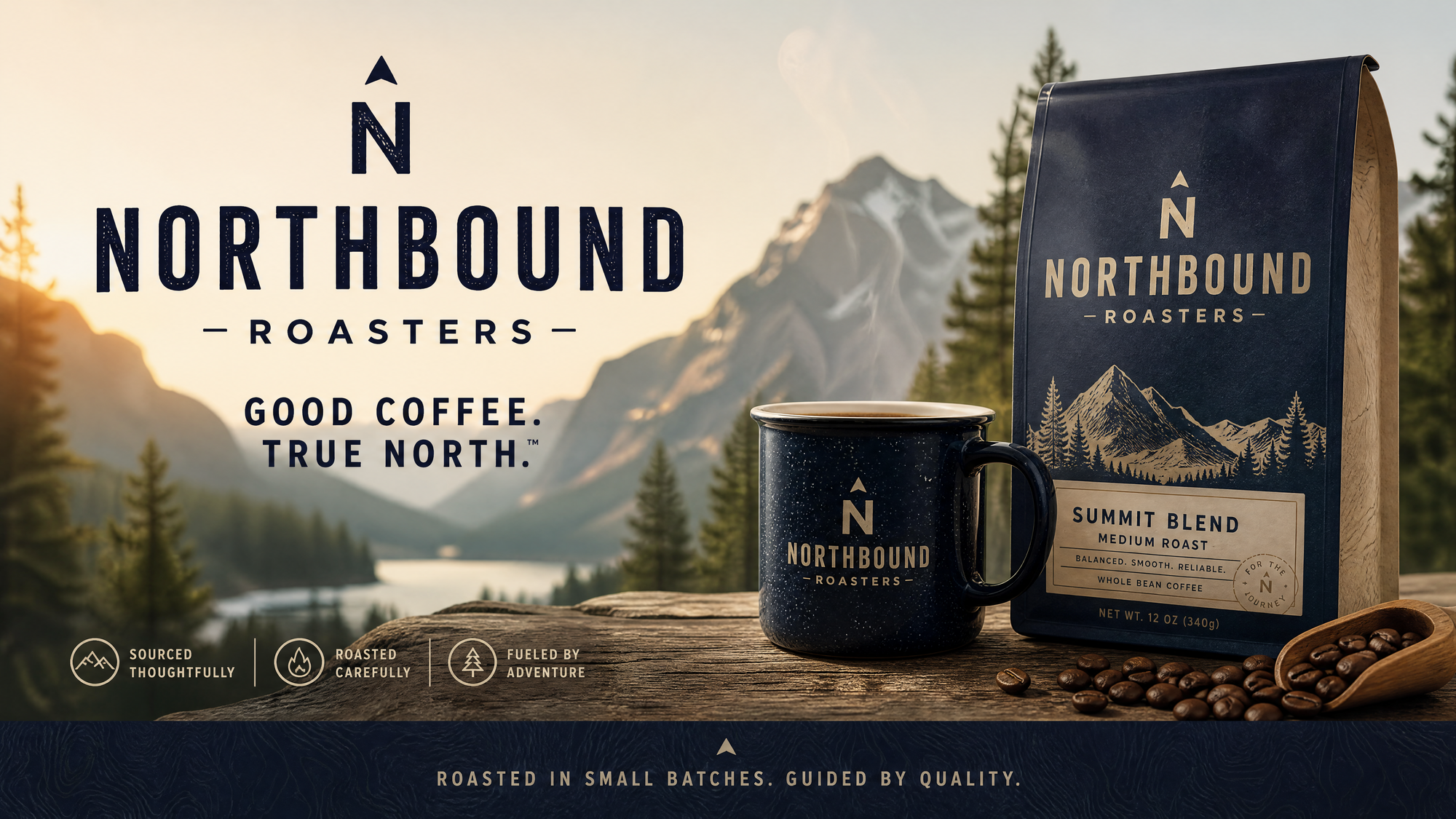
What it is: The benchmark for aesthetic AI image generation, now expanding into video.
How it felt to use: For stills, nothing else gives me that look — the lighting and texture out of Midjourney still set the bar for me, and the style and character references make it feel like a genuine art tool rather than a slot machine. Its character is taste. Where it left me wanting is that it's image-first: the video is improving but isn't yet at the dedicated tools' level, and the workflow takes some getting used to. Worth knowing up front, too — there's no free tier.
Pros:
· Best-in-class image aesthetics and style range
· Strong style/character reference controls for stills
· Huge creative community and prompt knowledge
Cons:
· Image-first; video less mature than rivals
· No free tier; commercial rights need a paid plan
· Stealth/confidentiality only from Pro up
Best for: Designers and artists who need the most beautiful stills.
9. Adobe Firefly — Best for commercial-safe assets + Creative Cloud
Prompt: a 15-second ad for a fictional coffee brand, "Northbound Roasters," made by Adobe
What it is: Adobe's generative suite (image + video), trained for commercial-safe output and built into Photoshop and Premiere.
How it felt to use: Firefly's pull, for me, is peace of mind — the commercially-safe content is a real difference the moment work is going on a client's channels — and it lives right inside Photoshop and Premiere, so it slots into how I already work instead of adding another tab. Its character is safe-and-integrated. What I noticed is that for a true hero shot the quality trails the top video models, and the results lean conservative; you also only get the best value if you're already paying for Creative Cloud.
Pros:
· Commercial-safe / indemnified generations
· Deep Photoshop/Premiere integration
· Standard generative features are uncredited/unlimited
Cons:
· Hero-shot quality behind the top video models
· Best value only inside a Creative Cloud plan
· More conservative, less "wow" output
Best for: Brands and teams already living in Adobe.
10. Leonardo AI — Best for game & stylized art assets
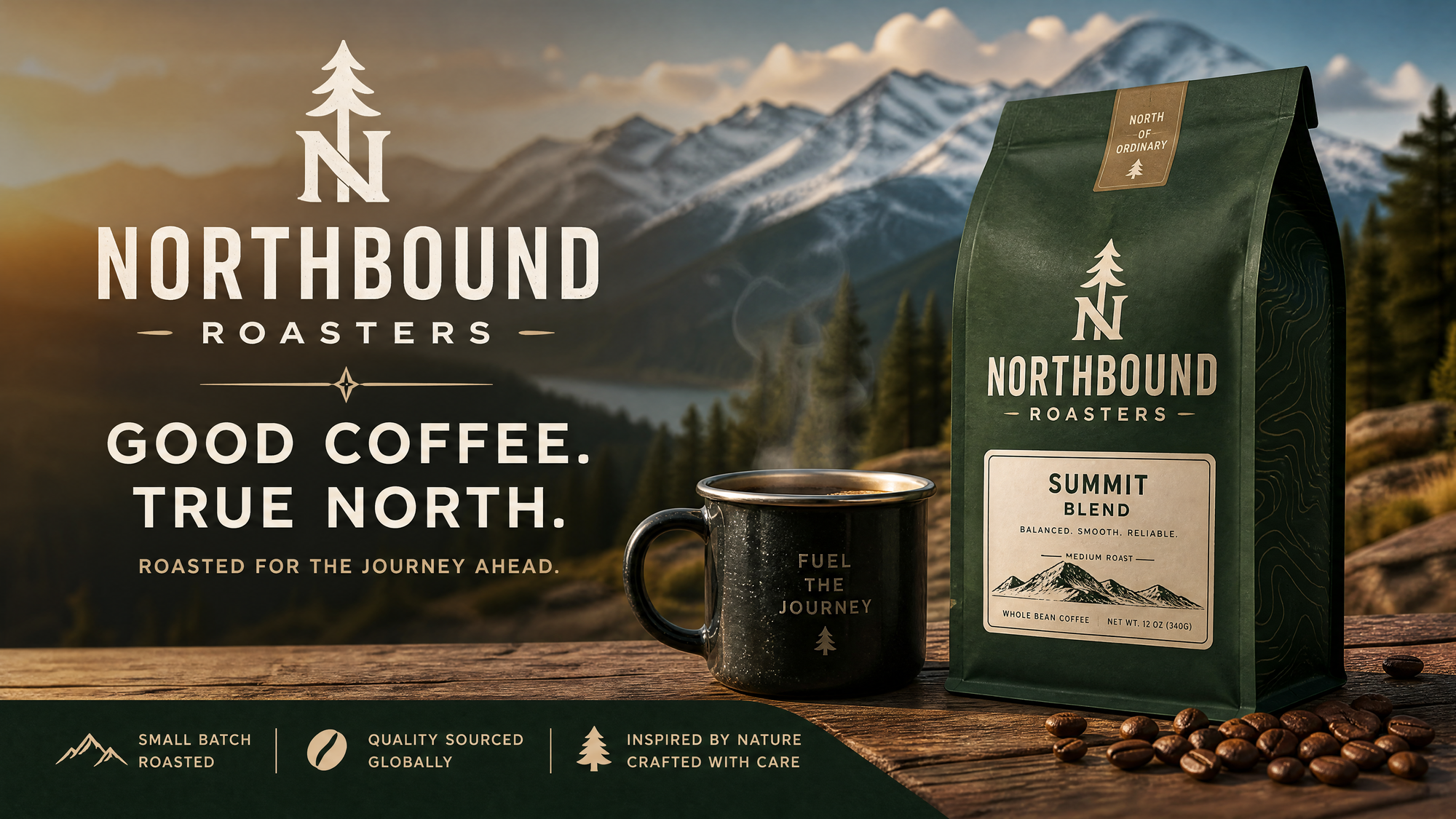
What it is: An image platform with fine-tuned models and asset-production controls (elements, control tools), with video features growing.
How it felt to use: For stylized and game-art stills, Leonardo gave me the most repeatable, on-style results — once I locked a look, I could keep producing in it — and the control options make it feel built for asset production rather than one-off art. Its character is stylized control. What I had to accept is that it's image-led — the video side is still early — and output quality swings a fair bit depending on which model you pick, so it rewards a bit of tuning.
Pros:
· Excellent for stylized/game art with strong control
· Multiple fine-tuned models for specific looks
· Generous free tier (150 tokens/day)
Cons:
· Image-led; video features still early
· Quality varies by model — needs tuning
· Less photoreal than the leaders
Best for: Game devs, illustrators, and concept artists.
How to choose
· Finished video from one brief → DeeVid Agent
· Single most cinematic shot → Seedance 2.0
· Generate-and-refine by conversation, with sound → Gemini Omni
· Frame-level control / VFX → Runway
· Long clips on a budget → Kling 3.0
· Most beautiful stills → Midjourney (or Leonardo for stylized/game art)
· Commercial-safe + Adobe workflow → Firefly
The real fork: do you want a tool that generates pieces, or an agent that delivers the whole thing? Pick accordingly.
Frequently asked questions
What is the best AI video agent in 2026?
For end-to-end work, DeeVid Agent — the only tool in our test to return a finished, edited video from one brief, starting free and from $10/month. For cinematic single shots, Seedance 2.0 and Gemini Omni lead.
Is Sora still available in 2026?
No. OpenAI discontinued Sora — the app and web shut down April 26, 2026, and the API ends September 24, 2026. The leading cinematic alternatives are Seedance 2.0, Gemini Omni, and Kling 3.0.
What's the difference between an AI video generator and an AI video agent?
A generator makes one clip or image from a prompt. An agent plans and runs the full workflow and delivers a finished, edited result. Agents reduce manual assembly; generators still require you to direct and edit.
Is there a free AI video agent?
Yes. DeeVid Agent offers a free trial (20 credits), and Runway, Kling 3.0, Pika, Luma, Firefly, and Leonardo all have free tiers with limits. Midjourney is the only tool here with no free tier.
Which AI tool is best for character consistency?
DeeVid Agent (reference-to-video) was the most consistent across multi-scene tests; Seedance 2.0's native multi-shot generation is the strongest among pure generators.
Which is best for marketing and social content?
DeeVid Agent for fast, on-brand finished pieces; Pika for quick trend effects; Firefly for commercial-safe assets.
Do AI video agents replace video editors?
For most short-form, marketing, and social content, an agent like DeeVid can deliver finished pieces without a separate editor. High-end film and VFX still benefit from human editors plus tools like Runway and Seedance 2.0.