
Image to Image AI
Image to Image AI lets you upload any photo and instantly transform it into on-brand, high-quality visuals.
Image to Image
Application Scenarios

Marketing, ads & landing pages
Quickly adapt hero images to different audiences and channels (website, banners, social ads, email headers) while keeping the core layout intact.
Prompt
Premium beauty landing page hero featuring a glass jar lip scrub surrounded by sliced peaches. Warm peach-toned palette, soft studio lighting, clean shadows. Modern cosmetic ad style with minimal e-commerce UI overlay. High-end product photography, realistic textures.

Design, branding & concept art
Explore different art directions (painterly, watercolor, manga, photoreal, flat illustration) while preserving composition and layout.
Prompt
A stylized 3D animated boy with glowing orange hair and large expressive eyes, holding a colorful game console. Neon-lit blue background, soft cinematic lighting, vibrant colors. Pixar-inspired 3D animation style, smooth textures, dreamy and futuristic mood.
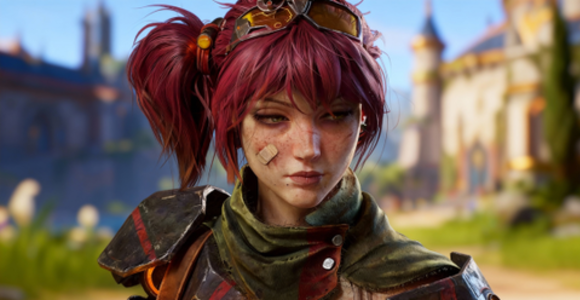
Game, animation & character design
Keep character identity consistent while generating new outfits, poses, and environments.
Prompt
A realistic fantasy game character portrait of a young female warrior with red hair tied in a ponytail. Freckled face, a small bandage on her cheek, wearing worn leather armor and metal shoulder plates. Steampunk-style goggles on her head, medieval fantasy village background, soft daylight. Cinematic lighting, shallow depth of field, high-detail game character render.
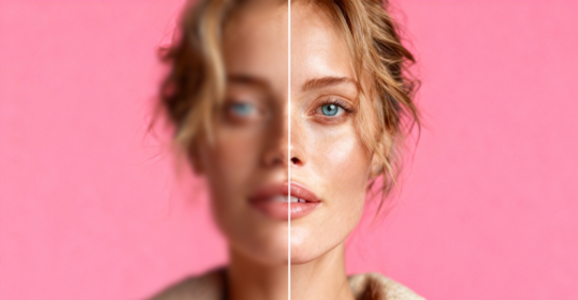
Photography enhancement & retouching
Clean up distractions with text-guided object removal and background changes. Restyle portraits into studio, film, or editorial looks while keeping facial features intact.
Prompt
Upscale blurry photo to sharp HD, restore natural details, no artifacts, realistic.
Advanced Features
Prompt-guided restyling
Describe the look you want—"watercolor illustration," "cinematic low-key lighting," "Ghibli-inspired forest scene"—and the AI transforms your reference image while preserving key elements.
Character & product consistency
Keep faces, characters, or products recognizable across many variations. Perfect for avatars, influencers, brands, and long-running campaigns.
Background swap & scene transformation
Replace plain or cluttered backgrounds with locations that match your story—studio, beach, cyberpunk street, cozy room—while the subject stays clean and sharp.
Object add/remove with prompts
Ask the AI to "remove the person in the background" or "add a coffee cup on the table." The tool fills or inserts elements naturally, matching light and perspective.
Canvas expand (outpainting)
Extend your image up, down, or sideways to fit hero banners, vertical stories, or thumbnails, while generating new content that blends seamlessly with the original.
How to Start Using Image to Image AI
Step 1
Upload your image:Start with a clear photo—portrait, product, landscape, or sketch. The AI uses this as the foundation.
Step 2
Describe the transformation:Write what you want to change: style, lighting, background, or specific elements to add or remove.
Step 3
Choose your settings:Pick aspect ratio, select AI model, and adjust how closely the output should follow your reference image.
Step 4
Generate & refine:Create multiple variations, compare results, and iterate on promising outputs to get exactly what you need.