
Top 6 Free or Low-Cost AI Design Tools for Beginners in 2026
If you have ever stared at a blank screen and thought, "I’m just not creative enough to launch a brand," we have good news.
In 2026, AI design tools have completely transformed the barrier to entry in the creative industry. Design skills that once required years of intense professional training can now be achieved with just a few prompts or simple clicks.
These tools have also eliminated the steep financial requirements that keep most great ideas parked on the drawing board. You no longer have to pay thousands of dollars for complex design software or expensive agency fees to bring your project to life. Cash-strapped founders can now effectively produce viral videos and custom merchandise courtesy of free or low-cost AI design tools that do the heavy lifting for you.
In this guide, we'll review the six most powerful AI design platforms on the market today. Our team made sure to compile a diverse range that spans software for video creation, graphic design, physical merchandise, and more.
II. Top 6 Tools Overview
| Tool Name | Best For | Key Features & Benefits | Limitations | Pricing |
|---|---|---|---|---|
| DeeVid AI | All-in-One AI Video Generation |
• Text/image-to-video with ambient sound • Pro-level motion control • AI talking heads with lip-sync • Pulls Sora, Veo 3, and Kling into one dashboard |
Not explicitly mentioned in the text. |
• 20 free credits upon sign-up • Paid plans $10 - $14/month including commercial rights |
| GSJJ AI Design Generator | Physical Products & Custom Gifts |
• One-click metallic rendering • Built-in manufacturing vocabulary optimization • Dual-side independent editing • No CAD or 3D modeling knowledge required |
Highly specialized for manufacturing physical metal goods; not for standard digital graphic design. |
• Design phase is 100% free • Pay only when placing a physical production order |
| Canva Magic Studio | Graphic Layout & Visuals |
• Magic Switch resizes designs for all platforms • Generates elements from text descriptions • Automatically handles layout grids |
Heavy AI usage across multiple posts can drain your monthly AI credit allowance fast. |
• Free version for basic layouts • Premium subscriptions start around $15/month |
| Leonardo.AI | High-Quality Concept Art |
• Visual sliders for aspect ratios and weights • Preset style models: anime, photorealistic, 3D • Easier to control than Midjourney |
Lacks pixel-perfect placement control, as it does not place items onto a rigid grid. |
• Free tier reloads with daily tokens • Paid plans start around $10/month |
| Microsoft Designer | Social Media Asset Generation |
• Powered by DALL-E 3 • Auto-styles images and text grids from a single sentence • Fast and beginner-friendly |
Sacrifices manual control; elements are locked, meaning no single-pixel nudging or heavy photo editing. | • Completely free, requires a standard Microsoft account |
| Figma AI | UI/UX Prototyping |
• Generates automated wireframes from text • Instant layer cleaning and renaming • Interactive mockups for structural mapping |
Lacks organic graphic design tools; requires importing raw brand artwork from external software. |
• Core workspace free, up to 3 files • Free Starter tier includes 500 AI credits/month |
1. DeeVid AI (Best All-in-One AI Video Generation Agent)
If visual marketing is a big part of your strategy, DeeVid AI is worth a serious look. It takes a text prompt, a photo, or a rough clip and turns it into a finished cinematic video in a few clicks. No editing experience needed.
This tool brings several features that cover the different stages of video production:
- Text/image-to-video: Describe what you want in a sentence and the tool builds the full scene, ambient sound effects included.
- Pro-level motion control: It uses start/end frame matching to stitch your static images into smooth, flowing video sequences.
- AI talking heads: Pick a digital avatar, drop in your script, and it handles the lip-sync. You never have to go anywhere near a camera.
- Instant soundtrack engine: Background music and voiceovers are generated right inside the same window, so your whole project stays in one place.
For a solo founder wearing five hats at once, that kind of consolidation matters. You are not paying for separate subscriptions or learning three different interfaces. DeeVid pulls Sora, Veo 3, and Kling into a single dashboard, which means you get the output quality of an agency setup without the agency overhead.
Pricing: You get 20 free credits when you sign up, which is enough to get a real feel for the tool. Paid plans start between $10 and $14 a month and include full commercial rights on everything you produce.
2. GSJJ AI Design Generator (Best Tool for Physical Products & Custom Gifts)
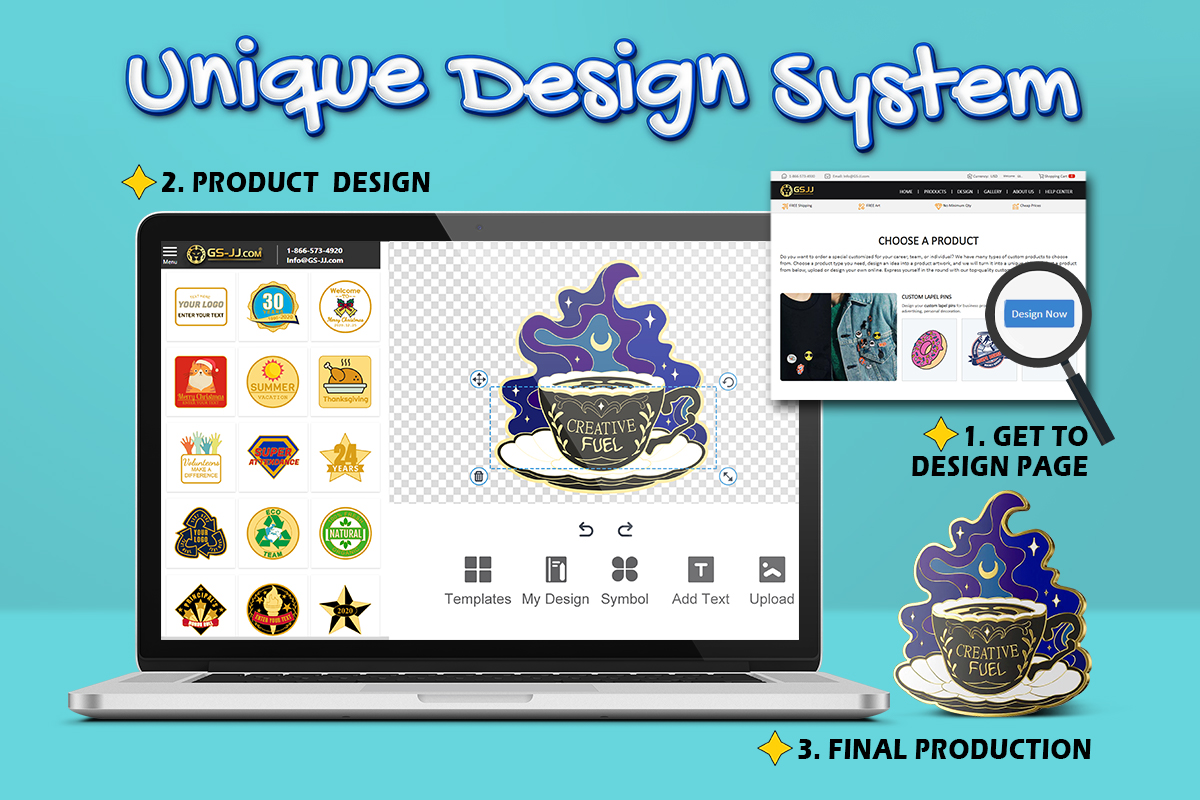
If you are ready to take your ideas into the physical world, the GSJJ AI Design Generator is a tool you should know about. It gives you a free mockup tool that translates your design ideas into physical branded assets, including corporate gifts, custom medals, challenge coins, and premium Custom Lapel Pins. You can even see an accurate preview of how your logo looks on stamped metal before it goes anywhere near a factory.
Key features of the tool include:
- One-click metallic rendering: Type in a text concept or drop in your business logo and the system generates realistic metal reliefs, custom textures, and plating effects in under 60 seconds.
- Built-in manufacturing vocabulary: The engine optimizes your prompts with real industrial terms like "antique silver finish," "3D relief," or "soft enamel mapping" so your digital ideas translate to factory machinery without getting lost in translation.
- Dual-side independent editing: Design and preview the front and back of your items separately, using live online tools to tweak elements as you go.
For independent founders and local community creators, it removes the barrier around industrial layout design. CAD software and 3D modeling knowledge is not a requirement here. Whether you are figuring out how to design custom pins for your gaming group, looking for the best designs for California lapel pins, or mapping out snake lapel pins, you can skip hiring a designer entirely.
Pricing: The design phase is 100% free. Generate unlimited high-definition digital proofs, play with layouts, and pull instant price quotes at no cost. You only pay when you are ready to place a production order.
3. Canva Magic Studio (Best tool for graphic layout and visuals)
Canva Magic Studio is the one most people already know. And for good reason. If you want your posts, ads, and banners to look like a designer made them, this is where you start.
The AI tools built into it automate a lot of the design process. Its Magic Switch feature takes one design and resizes it for every platform in a single click. You can generate new graphic elements from a text description, or stretch a photo background to fit a different layout without the image falling apart.
For solo founders managing daily marketing campaigns, the system handles layout grids on its own. That means less time editing and more time focused on sales.
The downside is the AI generation credit system. Running heavy text-to-image prompts or background edits across dozens of posts can drain your monthly allowance fast, which means buying more credits.
Pricing: The free version gives you solid layout access to start. Full AI tools unlock with premium subscriptions starting around $15 per month.
4. Leonardo.AI (Best for high-quality concept art generation)
If you like the cinematic look of Midjourney but want a simpler setup, Leonardo.AI is worth trying. It gives you direct control over your graphics, showing you exactly what your settings will produce before you hit generate.
The main benefit is the range of preset style models. Instead of typing long paragraphs of descriptive jargon to get a specific look, you select simple settings like anime, photorealistic rendering, or 3D vector graphics. The dashboard gives you visual sliders for aspect ratios and image weights.
Beginners can use this tool to build unique imagery for marketing campaigns, sketch out merchandise designs, or create brand illustrations that look nothing like stock photos. It lets you test creative ideas before committing to a final visual direction.
It can take a few attempts to get an exact layout because it does not place items onto a rigid grid. Some patience helps if you are trying to match a pixel-perfect placement requirement.
Pricing: The free tier reloads with daily tokens, which covers standard casual creation. Paid plans start around $10 per month if you need faster generation speeds or want to train custom models.
5. Microsoft Designer (Best social media asset generator)
When you just need a quick flyer to announce a sudden flash sale or a clean graphic to post on your feed before your afternoon deadline, Microsoft Designer keeps you from getting stuck. Powered by the advanced DALL-E 3 engine, this app skips all the overwhelming layout menus and confusing tools that usually make professional design apps a nightmare to learn.
The best part about this tool is how much manual clicking it saves you. You type in a single sentence describing the post you want, and the app builds a whole grid of options with the custom image and text layout already styled together in one go. You pick the one you like, swap the colors to match your brand logo, and hit download.
The tool comes in handy when you need to get an announcement out to your customers in a hurry without spending your entire lunch break editing. But be prepared to sacrifice some control, as the tool uses its automated engine to lock elements in place. You cannot manually nudge a text box by a single pixel or layer specific shapes in a custom order. If your project demands heavy photo editing, this may not be the best choice.
Pricing: The entire platform is completely free to use simply by logging in with a standard Microsoft account.
6. Figma AI (Best for UI/UX Prototyping)
When you are ready to expand your brand with a mobile app or a new website landing page, Figma AI handles the structural mapping for you. It takes the alignment work out of user interface design by automating your layout tasks.
The tool simplifies web architecture with a few smart shortcuts:
- Automated wireframes: Use its text engine to generate basic application blueprints and screen layouts from simple text descriptions.
- Instant layer cleaning: The AI replaces generic placeholder text and renames messy design layers with a single click.
- Interactive mockups: It structures your menus and content fields so you can visualize an online storefront experience before involving a developer.
The catch is that it lacks organic graphic design tools. It organizes structural layouts rather than manipulating raw photos, which means you will need to import your actual brand artwork from external software.
Pricing: The core workspace is free for individual users managing up to three files. The free Starter tier includes 500 AI credits per month.
The Only Thing Left Is to Start Building
By 2026, design is no longer the exclusive domain of a select few. With tools like these available for free or close to it, there is no real barrier left. From creating eye-catching video ads with DeeVid AI and transforming digital ideas into actual custom coins and pins with GSJJ, to handling your daily social media visuals with Canva, you have everything you need to do more on a tight budget.
The best way to figure out what works for your workflow is to roll up your sleeves and try them out. Visit the DeeVid AI official website to create your first marketing video, and head to GS-JJ.com to experience their free physical merchandise generator. Pick a tool, type in your first prompt, and start building your brand today.